Create. Train. Evolve.
The Future of AI-Driven Medical Simulation

AI Patient Generator lets you design clinical cases, train decision-making, and analyze performance — all in one intelligent system.
How It Works
Simple & clear
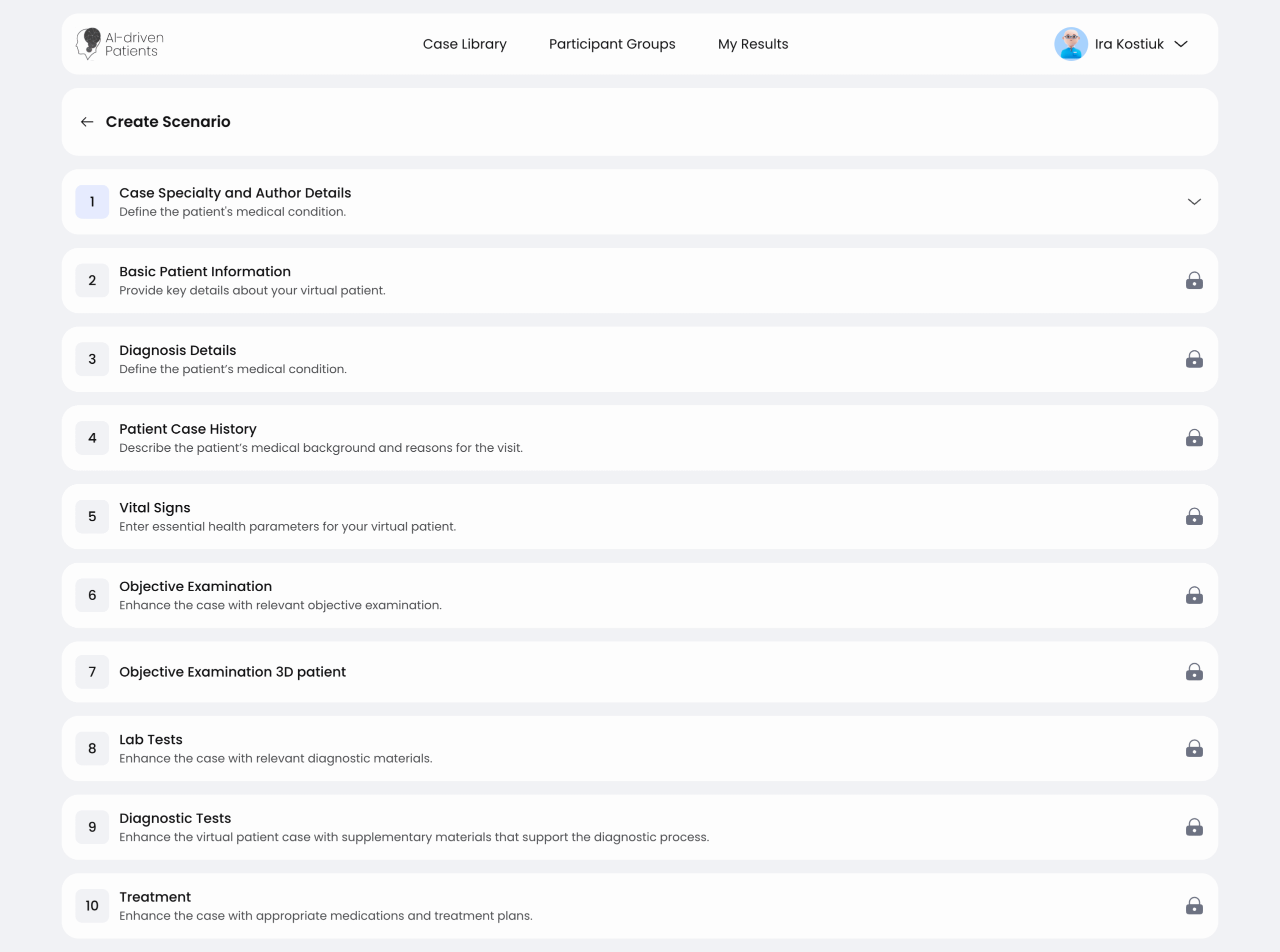
Create a patient case with AI
Generate realistic virtual patients instantly using advanced AI.

Customize parameters
Tailor every case to your goals — from symptoms to scenario complexity.
Run simulations with students or teams
Engage in real-time AI-driven clinical simulations for training and assessment.
View analytics and outcomes
Review detailed insights to measure performance and improve skills.
Teams & individuals
Who It’s For
Doctors
Medical Students
Medical Institutions
Hospitals
Teachers
Researchers
Pharmaceutical companies

Powerful & intuitive
Features & Capabilities
AI Scenario Generator
Instantly create realistic clinical cases powered by artificial intelligence.
Save time and explore limitless medical scenarios with just one click.
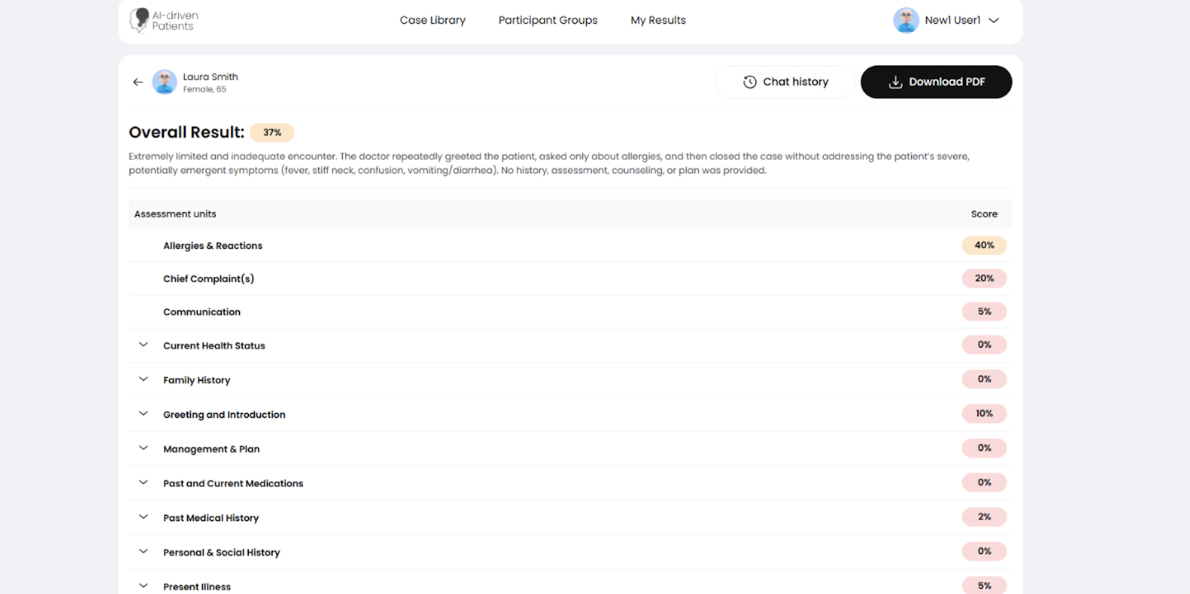
Integrated Debriefing
Review key decisions and outcomes with built-in post-simulation analysis tools. Help learners reflect, improve, and understand clinical reasoning in depth.
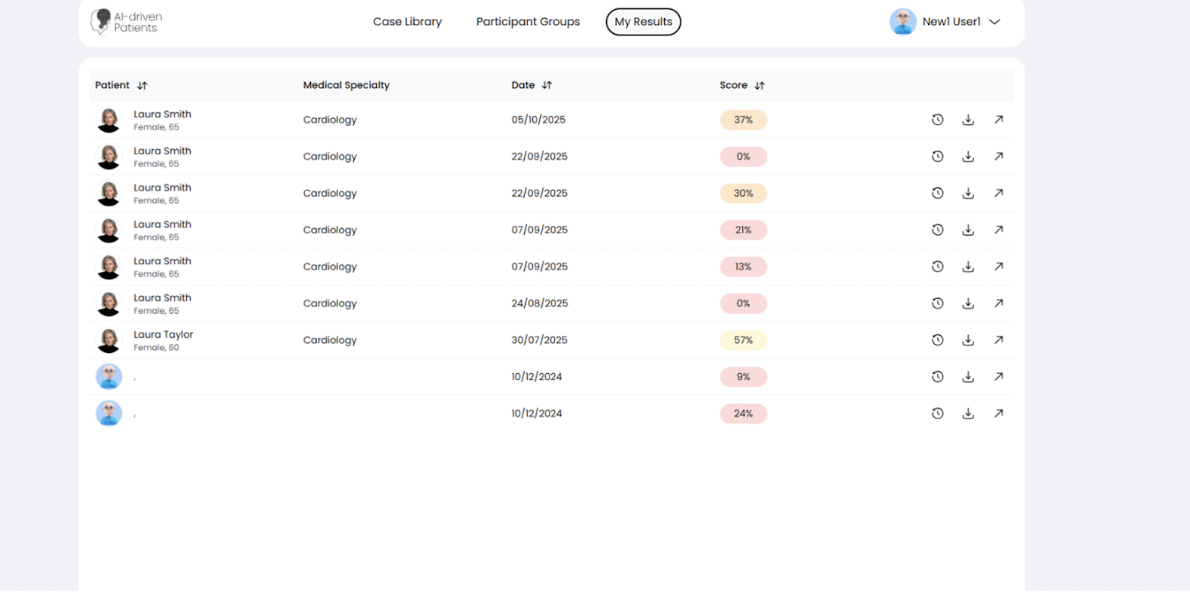
Group Analytics Dashboard
Track team performance, participation, and learning progress in one place.
Gain actionable insights into group dynamics and overall training impact.
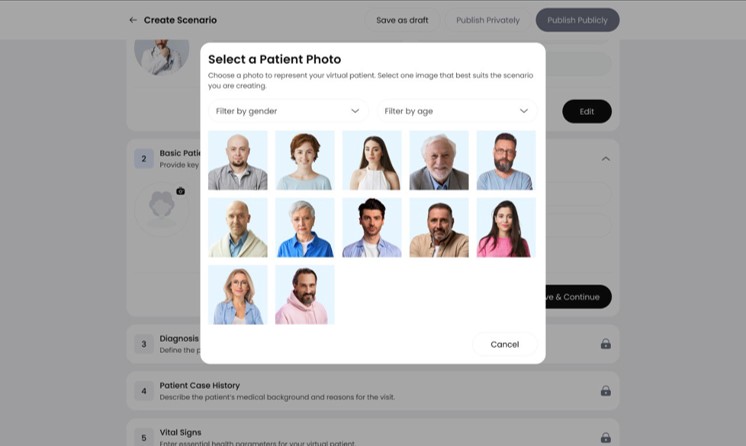
Custom Patient Profiles
Design unique virtual patients with specific conditions, histories, and behaviors.
Personalize every scenario to fit your specialty or curriculum goals.
Consultation mode
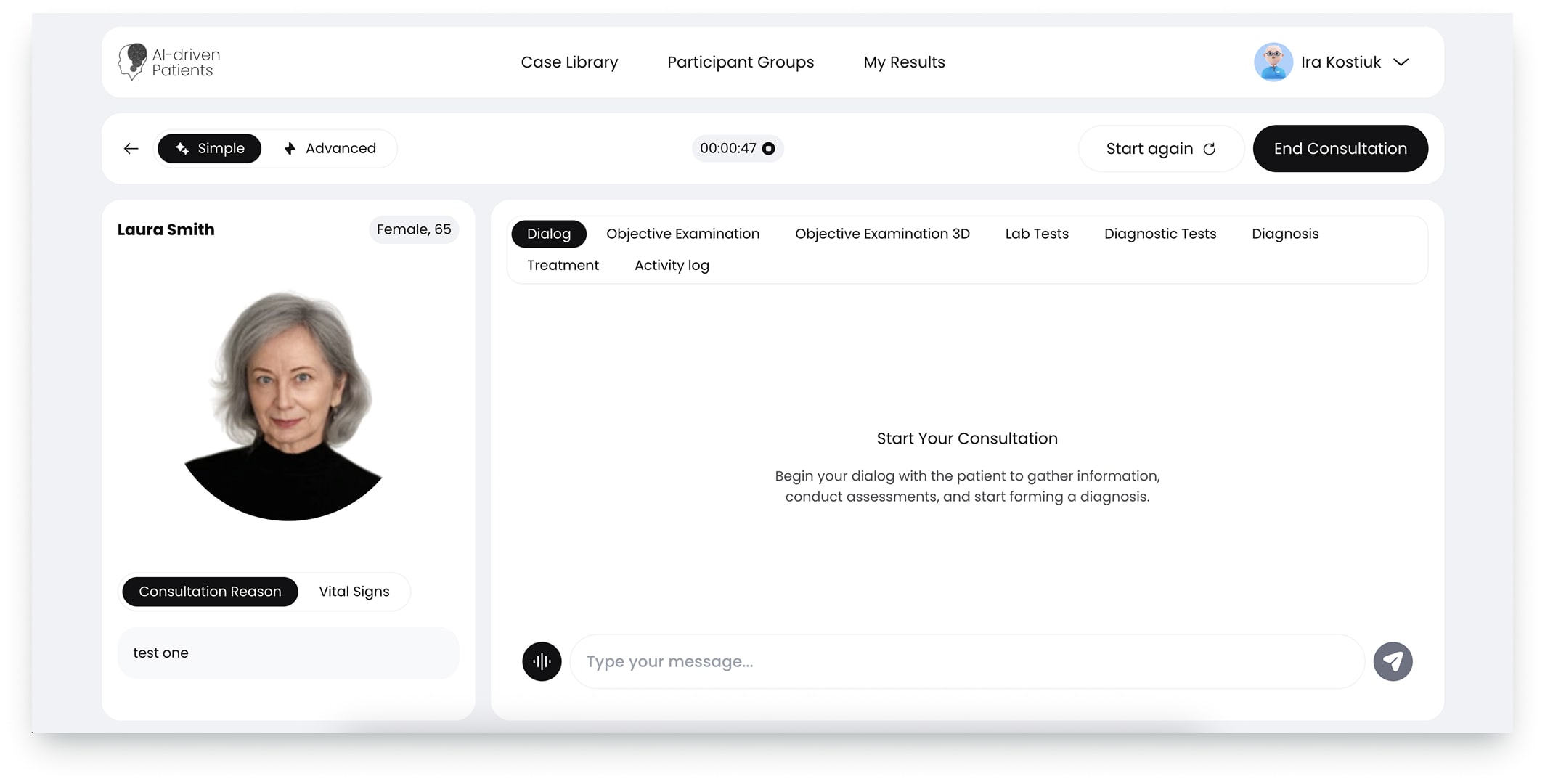
Practice realistic AI-driven patient consultations in a safe, interactive environment.
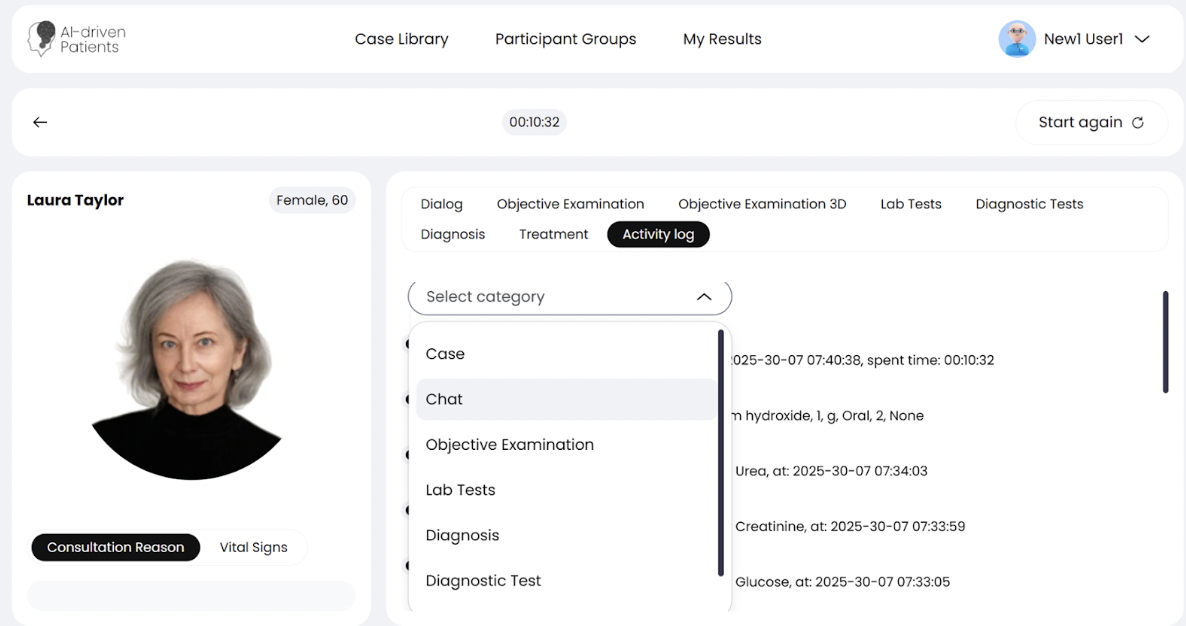
Ask targeted questions, assess symptoms, make diagnostic or treatment decisions, and receive structured feedback to strengthen clinical reasoning and communication skills.
Realistic & flexible
Simulation Modes
For Educators & Trainers
Creator Mode
Design interactive clinical scenarios from scratch or with AI assistance. Set diagnoses, patient histories, and behavioral patterns to fit your learning goals.Collaborate with colleagues or share simulations with your students instantly.
For Students & Practitioners
Consultation Mode
Engage with AI-driven virtual patients in realistic, dynamic consultations. Ask questions, analyze symptoms, and make diagnostic or treatment decisions in real time. Receive immediate feedback to strengthen your clinical reasoning and communication skills.

Try. Learn. Improve.
Demo scenarios
Simulate an asthma or COPD case.
Cough & Shortness of Breath
Simulate an asthma or COPD case.
Cough & Shortness of Breath
Simulate an asthma or COPD case.
Cough & Shortness of Breath
Smart. Simple. Effective.
Benefits
LEARN — for Students
- Realistic Learning at Scale
- Smarter Clinical Reasoning
- Safe, Error-Free Environment
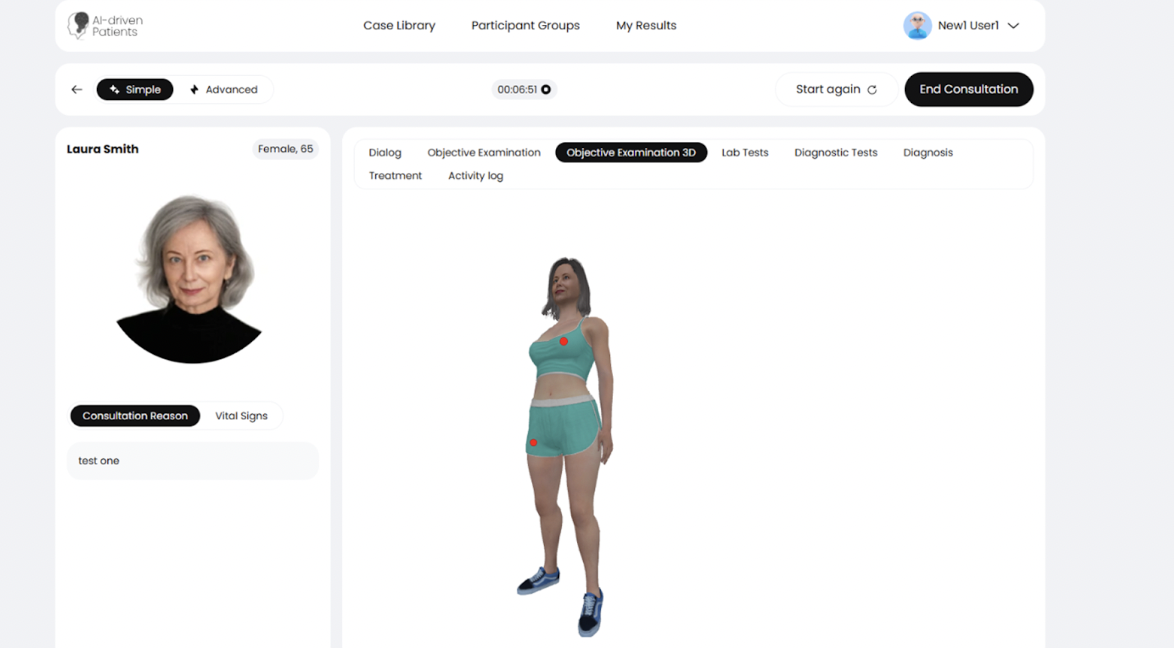
- 3D Examination
- Multilingual AI Patients

CREATE — for Educators
- Automated Performance Tracking
- Simulation Log + Reports
- Large Case Library
- Fast Case Creation (Creator Mode)
- Media Library Integration

MANAGE — for Institutions
- Team Collaboration & Assessment
- Group & Role Management
- Scalable Deployment
- Curriculum Alignment
- Accreditation-ready analytics

Real stories. Real impact.
Testimonials
This made me realize I have so much more that I need to study. I need to go back and revise once again. It also made me come to term with time management skills and patience and knowing how to diagnose the patient effectively without unnecessarily extra labs.
Anna, student
I was feeling unsure about my medical knowledge. This was too long in my opinion. I feel tired but happy I did it. I now feel more confident about my knowledge & learned a few things!
Anatolii, teacher
Before the clinical case I was stressed, anxious of making mistakes and not confident in my knowledge. After the clinical case, I feel calm, confident in my knowledge (though not sufficient), I feel more motivated to keep studying to get better. I am hopeful for the future
Oksana, student
This made me realize I have so much more that I need to study. I need to go back and revise once again. It also made me come to term with time management skills and patience and knowing how to diagnose the patient effectively without unnecessarily extra labs.
Anna, student
Trusted Institutions
Partners & Institutions
Trusted Institutions
Plans & Pricing
Demo version
Try the platform with limited access — explore up to 3 AI-generated scenarios and experience intelligent virtual patients in action.
Free
- Access to 3 pre-built clinical scenarios
- Real-time interaction with AI patients
- Basic analytics and feedback
- Personal dashboard for tracking attempts
- Scenario creation tools
Individual Plan
Perfect for students, educators, and healthcare professionals who want to explore AI-powered clinical simulations independently.
25$
user/month 20% off- Access to AI patient simulations
- Scenario creation tools
- Performance feedback & analytics
- Personal learning dashboard
Corporate Plan
Designed for universities, hospitals, and training centers looking to integrate large-scale AI simulations into their programs.
30$
25$
20$
10$
300$
250$
200$
100$
user/year 16.67% off 16.67% off 16.67% off 16.67% offDrag the slider to increase the number of users who will use the AI-Patient Generator.
- Group Creation
- Subgroup Management
- Add Users to Group
- Group Performance Overview
- Dedicated support & onboarding
Questions & Answers
Frequently Asked Questions

01. How realistic are the AI-generated patients?
Virtual patients combine AI medical language models with structured clinical logic defined in each scenario.
Their behavior is driven by:
• predefined patient history created in the Scenario Creator,
• configured symptoms and examination findings,
• vital signs and diagnostic data,
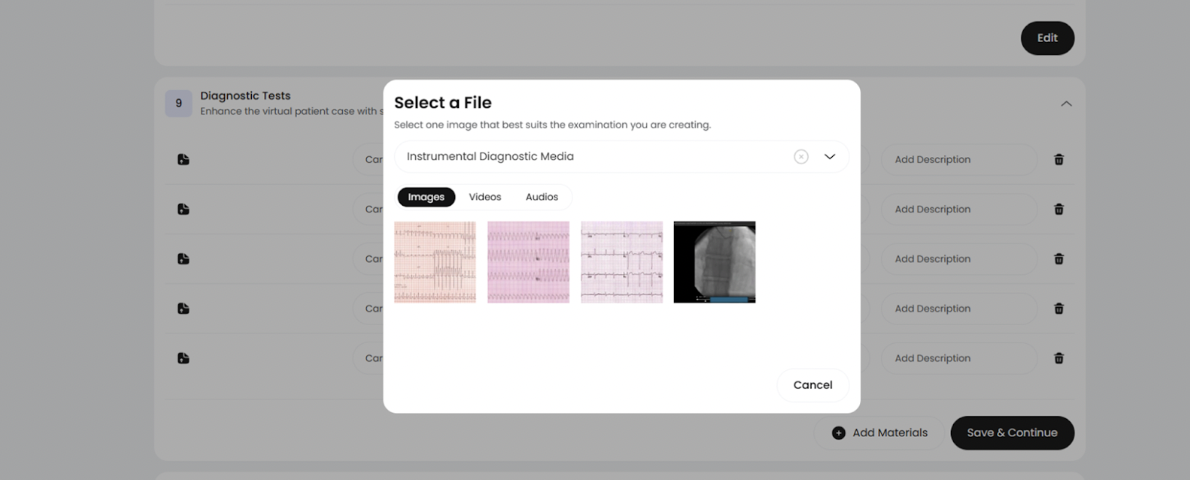
• integrated media (images, videos, auscultation sounds),
• natural-language AI responses adapted to the case.
This ensures consistent, medically coherent interaction rather than generic AI conversation.
02. What makes each patient unique?
Every scenario includes:
• personalized demographics and visual identity,
• custom anamnesis and case description,
• predefined vital signs,
• system-based examination findings,
• 3D markers with attached media,
• selected laboratory and diagnostic tests,
• treatment options linked to the medical directory.
All these components shape how the AI patient behaves and responds during the consultation.
03. Can I create my own virtual patient cases?
Yes. The Creator Mode allows educators and institutions to build cases from scratch:
• define the patient profile,
• generate or write medical history,
• configure examinations and 3D findings,
• attach media files,
• add lab and diagnostic studies,
• specify diagnosis and treatment.
You can publish cases privately or share them with your institution.
04. What is Consultation Mode?
Consultation Mode simulates a real clinical encounter.
Learners can:
• ask any medical questions,
• collect history,
• review vital signs,
• examine the patient in 2D or 3D,
• order laboratory and diagnostic tests,
• establish diagnoses and treatment plans.
AI responds according to the scenario’s clinical logic, ensuring structured and realistic communication.
05. How is learner performance evaluated?
The platform automatically records and evaluates every action taken during the simulation.
Simulation Log
A real-time log captures each step — questions asked, examinations performed, tests ordered, diagnoses entered, and treatments selected — in precise chronological order.
Performance Report
Based on the log, the system generates a structured report summarizing:
• completeness of history-taking and examination,
• relevance of diagnostic choices,
• accuracy of clinical reasoning,
• appropriateness of treatment.
06. How do group and institutional management features work?
The platform includes dedicated tools for universities, medical schools, and corporate clients to manage large cohorts of learners.
Core capabilities:
- Group Creation – institutions can create groups for courses, year cohorts, or clinical modules.
- Subgroup Management – organize students into smaller units (e.g., tutorial groups, rotations, OSCE stations).
- Add Users to Groups – administrators can bulk-add students or staff via email upload or integration.
- Group Performance Overview – faculty can monitor progress, see completion rates, evaluate common mistakes, and analyze learning patterns across the group.
- User Role Management – assign roles such as Student, Instructor, Group Administrator, or Institution Owner with different access rights.
These tools make it easy to deploy AI-Driven Patients at scale across entire programs and faculties.
07. What media formats can be used inside scenarios?
The Creator Mode supports a comprehensive media library, including:
• patient photos,
• 3D body markers,
• images of physical findings,
• ECG strips, X-ray photos, ultrasound clips,
• auscultation audio, murmurs, breath sounds,
• custom instructor-uploaded files.
Media enhances clinical realism and improves interpretation skills.
08. Is my data secure?
Yes. AI-Driven Patients follows GDPR standards.
• All data is encrypted.
• User records are stored securely.
• No educational data is used for training external models.
• Access is restricted to authorized institutional users.
09. How can I get access to the platform?
You can:
• request a live demo,
• receive trial access for your faculty,
• get pricing for institutional licenses,
• integrate the platform into your university’s curriculum.
We provide flexible B2B plans with scalable pricing per user.
10. How does pricing work?
Pricing is based on an institutional licensing model.
It depends on:
-
number of active users,
-
type of access (students, instructors, administrators),
-
duration of the license.
We offer scalable B2B plans for universities, hospitals, and training centers.
Custom pricing is available for large cohorts and long-term programs.
11. Does the platform support OSCE-style training and assessment?
Yes. Scenarios can be designed to mirror OSCE stations with predefined objectives, expected actions, and assessment criteria.
Learners’ actions are logged step by step, enabling structured evaluation, feedback, and comparison across cohorts.
12. Can the platform be integrated into existing curricula or LMS?
Yes. The platform is designed for institutional use and can be integrated into existing educational workflows.
Access can be organized by courses, modules, or academic years.
LMS integration and single sign-on options can be discussed during institutional onboarding.
13. Is the platform suitable for different specialties and levels of training?
Yes. Scenarios can be adapted for undergraduate students, residents, and practicing clinicians across multiple specialties.
Complexity, available data, and decision depth can be adjusted to match learning objectives.
Train smarter. Heal better
Create. Simulate.
Learn — with AI in Medicine